Image catalog for macOS
Every image in its place. Every work documented.
Obscura Catalog organizes and describes your images, enriches their metadata, keeps the catalogue raisonné of the body of work, and exports it in heritage formats.
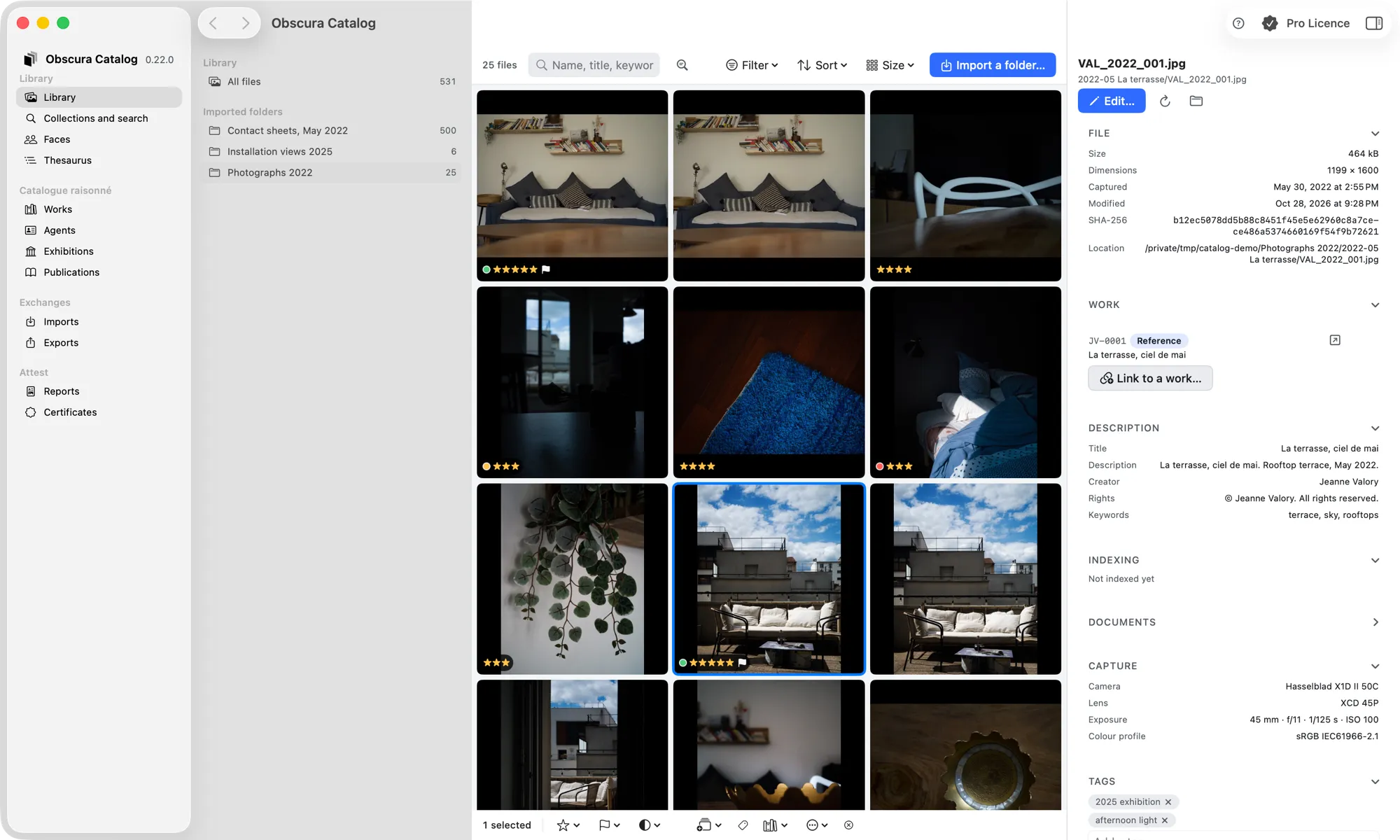
Enrich metadata
Find images again
Why
An image without context is a lost image.
What is known about a work — who made it, where it was shown, who owned it — matters as much as the file.
Images without context
Works, agents, and attributions give each image its author and its place.
Poorly tracked prints
The catalogue records the prints of each work.
A scattered history
Exhibitions, publications, and provenance are attached to the work they concern.
Underused metadata
Obscura Catalog builds on EXIF and XMP metadata and lets you enrich it.
Captive data
LIDO, CIDOC-CRM, and CSV exports open the catalogue to institutions and spreadsheets.
Authenticity to establish
Obscura Catalog issues certificates of authenticity.
Method
From image to catalogue raisonné.
Obscura Catalog supports cataloging work, from organizing images to exporting.
- 01
Organize
Gather and organize your images.
- 02
Describe
Describe works, the agents who created them, and the attributions that link them.
- 03
Enrich
Complete the EXIF and XMP metadata of your images.
- 04
Document
Track the prints, exhibitions, publications, and provenance of each work.
- 05
Find
Find an image or a work when you need it.
- 06
Export
Export your catalogue as LIDO, CIDOC-CRM, or CSV.
Features
Organize, describe, enrich, find.
From sorting images to the catalogue raisonné and its exports.
Organize and find
Import your image folders: each file is referenced where it is, with its SHA-256 digest, then sorted, rated and found again.
Catalogue raisonné
Describe an artist's body of work the way a catalogue raisonné does: works, agents and attributions, prints, exhibitions, publications, and provenance.
Learn moreEXIF and XMP metadata
Obscura Catalog builds on the EXIF and XMP metadata of images, and lets you enrich it.
Learn moreLIDO, CIDOC-CRM, CSV exports
Export your catalogue in formats recognized by heritage institutions, or as a spreadsheet.
Learn moreCertificate of authenticity
Obscura Catalog issues certificates of authenticity: signed archival PDFs, recorded in a register, verifiable offline and online.
Learn morePrinciples
Recognized standards, a proven model.
Obscura Catalog speaks the formats of institutions and imaging software.
Heritage standards
LIDO and CIDOC-CRM, two standards maintained by the ICOM CIDOC committee, to exchange with institutions.
Standard metadata
EXIF and XMP, the metadata read by cameras and imaging software.
CSV for everyone
A CSV export that every spreadsheet can read.
The catalogue raisonné model
Works, agents, attributions, prints, exhibitions, publications, and provenance.
Authenticity
A certificate of authenticity issued by the app.
On your Mac
A macOS app from the Obscura Flow ecosystem.
Who it's for
Who Obscura Catalog is for.
Obscura Catalog keeps the catalogue raisonné of a photographic body of work. Its certificates of authenticity are issued in one of these capacities:
- Photographers
- Heirs and estates
- Galleries
- Foundations
- Experts
- Museums
Its LIDO and CIDOC-CRM exports are meant for museums, collection portals and institutions working with linked data; its Inventory report, for insurers and registrars.
FAQ
Frequently asked questions.
What is Obscura Catalog?
A macOS app to organize and describe images, enrich their metadata, and find them again, up to the catalogue raisonné of a body of work. It comes from Obscura Flow and is part of its ecosystem.
What is a catalogue raisonné?
The documented, as-complete-as-possible record of an artist's body of work. Obscura Catalog structures it into works, agents, attributions, prints, exhibitions, publications, and provenance.
Which export formats are available?
LIDO and CIDOC-CRM, two cultural heritage standards, and CSV. The “Exports” page presents them.
Which image metadata is supported?
EXIF and XMP metadata, which Obscura Catalog lets you enrich.
What is the certificate of authenticity?
An archival PDF (PDF/A-2b) that attests, signed and dated, the authenticity of a work or a print. It carries a signed manifest (Ed25519): any change is detected, offline in the app or online at the address printed on the certificate. The “Certificate” page details its content.
How much does Obscura Catalog cost?
Downloading is done from the Obscura member area: it requires an account and an Obscura Catalog license, the free plan included, granted once your request is approved. Once installed, the free tier lets you browse, search, describe up to 50 works, import files and a CSV, export CSV, issue up to 10 certificates of authenticity and verify certificates. A paid license opens the LIDO and CIDOC-CRM exports, the Lightroom import, a catalogue of more than 50 works and issuing more than 10 certificates. License prices have not been published yet.
Next step
Give every work its catalogue.
Obscura Catalog is available for macOS. Download it from the Obscura member area, or write to us to learn more.